10 Common Questions About Multi-Parameter Analyzers: From Channel Configuration to Temperature Compensation Multi-Parameter Analyzer FAQ Temperature Compensation Channel Configuration Calibration
Expert answers to the most frequently asked questions about multi-parameter water quality analyzers — from setup and operation to maintenance and troubleshooting
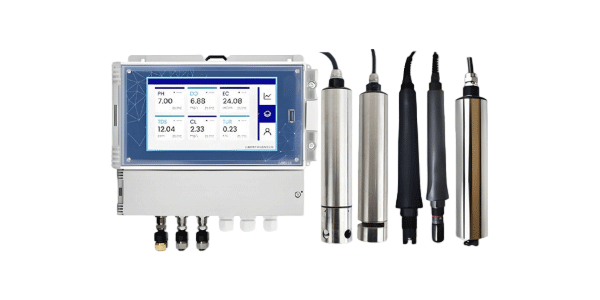
Multi-parameter water quality analyzers are powerful instruments that can measure multiple parameters simultaneously, making them indispensable for environmental monitoring, wastewater treatment, aquaculture, and industrial process control. However, their versatility often leads to questions about configuration, operation, and maintenance. This article addresses the 10 most common questions we receive from users, providing clear, practical answers to help you get the most from your analyzer.
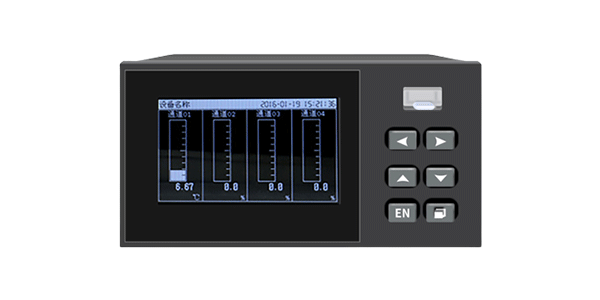
Q1: How many channels does a multi-parameter analyzer typically support, and how do I configure them?
A: Most multi-parameter analyzers support between 4 and 8 channels, with some advanced models supporting up to 16 channels. Each channel can be assigned to a specific sensor (pH, DO, conductivity, turbidity, etc.) or parameter.
Configuration tips:
-
Identify your parameters: List all parameters you need to measure (e.g., pH, DO, conductivity, temperature, ORP, ammonia).
-
Match sensors to channels: Assign each sensor to an available channel in the analyzer's setup menu.
-
Set measurement ranges: Configure the expected range for each parameter to optimize accuracy.
-
Enable/disable unused channels: If you have fewer sensors than channels, disable unused channels to simplify the display and reduce confusion.
-
Label channels clearly: Use descriptive names (e.g., "Influent pH", "Aeration DO") for easy identification.
Pro Tip: Most analyzers allow you to save channel configurations as profiles. Create different profiles for different applications (e.g., "Wastewater" vs. "Drinking Water") to speed up reconfiguration.
Q2: What is temperature compensation, and why is it critical for accurate measurements?
A: Temperature compensation adjusts measurement readings to account for temperature-related changes in the sample and sensor behavior. It is critical for pH, dissolved oxygen, and conductivity measurements because these parameters are inherently temperature-dependent.
|
Parameter
|
Temperature Effect
|
Compensation Method
|
|
pH
|
Nernst slope changes with temperature (0.03 pH/°C error if uncompensated)
|
Automatic Temperature Compensation (ATC) using built-in temperature sensor
|
|
Dissolved Oxygen
|
Oxygen solubility decreases as temperature increases
|
ATC adjusts DO reading based on temperature
|
|
Conductivity
|
Ion mobility increases with temperature (~2%/°C)
|
ATC uses temperature coefficient (adjustable) to correct reading to reference temperature (usually 25°C)
|
Best practice: Always enable ATC and ensure the temperature sensor is in the same solution as the parameter sensor for accurate compensation.
Q3: Can I connect sensors from different manufacturers to a single multi-parameter analyzer?
A: It depends on the analyzer's communication protocol and connector type.
-
Digital sensors (Modbus RTU/RS485): If both the analyzer and sensors use the same protocol, they may be compatible. However, register mapping can differ between brands, so compatibility is not guaranteed.
-
Analog sensors (4-20mA): Most analyzers accept analog inputs, so any manufacturer's sensor with 4-20mA output can be connected, provided the input range matches.
-
Smart digital sensors: Some manufacturers (e.g., METTLER TOLEDO, Hach) use proprietary protocols that only work with their own analyzers.
Recommendation: For best results, use sensors from the same brand as your analyzer. If mixing brands, test compatibility before purchasing and keep spare sensors on hand.
Q4: How often should I calibrate the sensors on a multi-parameter analyzer?
A: Calibration frequency depends on the sensor type, application, and environmental conditions. Use this table as a general guide:
|
Sensor Type
|
Clean Water / Drinking Water
|
Wastewater / Harsh Conditions
|
|
pH / ORP
|
Monthly
|
Weekly to Monthly
|
|
Optical DO
|
Every 3-6 months
|
Monthly
|
|
Polarographic DO
|
Weekly
|
Daily to Weekly
|
|
Conductivity
|
Quarterly
|
Monthly
|
|
Turbidity
|
Quarterly
|
Monthly
|
|
Ammonia (ISE)
|
Monthly
|
Weekly
|
Always recalibrate: after sensor cleaning, membrane replacement, or if readings drift unexpectedly.
Q5: What data logging and communication options are available?
A: Modern multi-parameter analyzers offer several data logging and communication options:
-
Onboard memory: Store calibration and measurement data internally (typically 1,000-10,000 records).
-
USB/SD card: Export data to USB drive or SD card for manual transfer.
-
4-20mA analog outputs: Transmit real-time readings to PLC/SCADA systems.
-
Modbus RTU/TCP: Digital communication for integration with automation systems.
-
Ethernet/IP or Profibus: For industrial network integration.
-
Wireless options: Some models offer WiFi, LoRaWAN, or 4G/5G for remote monitoring.
Pro Tip: For regulatory compliance, ensure your analyzer can generate calibration reports and audit trails. Some digital models store sensor calibration history directly in the sensor chip.
Q6: How do I know if my sensor needs cleaning or replacement?
A: Look for these indicators:
-
Slow response time: Takes significantly longer than usual to stabilize.
-
Drifting readings: Values slowly increase or decrease over time.
-
Calibration failure: Slope or offset falls outside acceptable range.
-
Physical damage: Cracks, scratches, or deposits on the sensor surface.
-
Visual contamination: Visible biofilm, scale, or debris on the sensing element.
|
Sensor
|
Cleaning Method
|
Replacement Frequency
|
|
pH electrode
|
Wipe gently, soak in cleaning solution
|
6-18 months
|
|
Optical DO cap
|
Wipe with soft cloth
|
2-4 years
|
|
Conductivity
|
Soft brush, mild detergent
|
3-5 years
|
|
Turbidity
|
Clean optical window, detergent soak
|
2-4 years
|
|
Ammonia ISE
|
Replace membrane, clean reference
|
6-18 months
|
Q7: Can I use a multi-parameter analyzer for both laboratory and field applications?
A: Yes, but with some considerations:
-
Benchtop models: Designed for laboratory use, offer high accuracy, data logging, and advanced features but are not portable.
-
Portable models: Battery-powered, rugged, and waterproof, suitable for field use. May have fewer channels and slightly lower accuracy.
-
Benchtop with field kit: Some benchtop analyzers have optional portable carrying cases and battery packs for limited field use.
Best practice: Choose a portable model if you need both field and lab capabilities. For dedicated lab work, a benchtop analyzer is recommended.
Q8: How do I set up automatic temperature compensation (ATC) correctly?
A: Follow these steps for proper ATC setup:
-
Ensure the temperature sensor is connected and recognized by the analyzer.
-
Enable ATC mode in the analyzer's settings (usually under "Measurement" or "Temperature" settings).
-
Select the reference temperature (typically 25°C for conductivity, 20°C or 25°C for pH).
-
For conductivity, set the temperature coefficient if your application requires a specific value (default is usually 2.0%/°C).
-
Place the temperature sensor in the same solution as the parameter sensor for accurate compensation.
Note: Without ATC, a 10°C temperature change can cause a 0.3 pH error, a 2-3% DO error, and a 2% conductivity error per °C. Always use ATC for accurate results.
Q9: What power supply options are available for multi-parameter analyzers?
A: Multi-parameter analyzers typically support these power options:
-
AC power (110-240V): Standard for benchtop models and panel-mounted units.
-
DC power (12-24V): Common for portable and field-deployable analyzers.
-
Battery power: Many portable models have rechargeable batteries (Li-ion) that provide 8-24 hours of operation.
-
Solar power: Some remote monitoring systems use solar panels with battery backup.
-
PoE (Power over Ethernet): Available on some networked models for simplified wiring.
Tip: When choosing a power option, consider your deployment location (lab, field, remote), duration of use, and availability of mains power.
Q10: How do I troubleshoot common errors like "Sensor not found" or "Out of range"?
A: Here are the most common errors and their solutions:
|
Error Message
|
Likely Cause
|
Solution
|
|
"Sensor not found"
|
Loose connection, faulty cable, incompatible sensor
|
Check connections, test cable, verify sensor compatibility
|
|
"Out of range"
|
Sample exceeds sensor's measurement range, or sensor needs calibration
|
Check expected sample value, calibrate sensor, or adjust range
|
|
"Temp compensation error"
|
Temperature sensor not connected or faulty
|
Connect temperature sensor, replace if faulty, or use manual compensation
|
|
"Calibration failed"
|
Wrong buffer, dirty sensor, expired standard
|
Use fresh buffer, clean sensor, recalibrate
|
|
"Sensor drift"
|
Contamination, aging, or reference junction issues
|
Clean sensor, check reference electrolyte, replace if necessary
|
Quick Tip: For digital sensors, check the sensor's diagnostic data (glass impedance, reference impedance) to identify underlying issues before they cause errors.
Summary: Getting the Most from Your Multi-Parameter Analyzer
Key Takeaways:
-
Understand your channel configuration needs before setup
-
Always enable automatic temperature compensation (ATC) for accurate readings
-
Calibrate sensors regularly based on application and environment
-
Use digital sensors with onboard diagnostics for easier troubleshooting
-
Choose the right power and communication options for your deployment
-
Keep spare sensors and consumables on hand to minimize downtime
-
Document all configurations, calibrations, and maintenance for audit trails
Multi-parameter analyzers are powerful tools that, when properly configured and maintained, deliver reliable, accurate data for years. By understanding these common questions and their answers, you can avoid many common pitfalls and ensure your analyzer performs at its best.